Service Operational Mode
CygNet services can be run as processes or as a Windows service. A process runs in the foreground, such as Microsoft Word. A Windows service runs at a low level in the background. For a user to log on or out of a computer a process must be stopped; a service can continue running.
Regardless of the operational mode, CygNet Host Manager can be used to control the services. In addition, both modes allow automatic startup when the computer boots. When the services are configured to run as processes, a shortcut to start the CygNet Host Manager with a command-line parameter to automatically start the services can be included in the computer’s Startup group. A Windows service can be configured to start automatically or manually.
Process Mode
When a service runs as a process the computer must boot before the process can be started. The boot process requires a domain account. If CygNet services will require access to network drives for tasks such as copying backup files, the domain account must have those privileges.
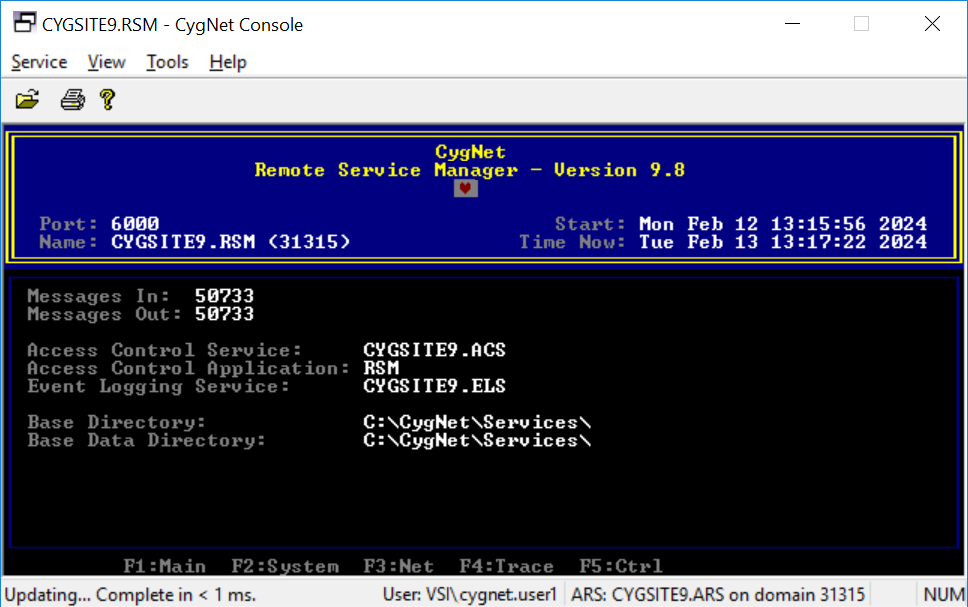
When the CygNet services run as processes, the Remote Service Manager (RSM), at a minimum, will be shown on the task bar. Whether or not other services show depends upon the configuration of the RSM. The RSM starts and stops other CygNet services. When the RSM starts, it restores all services to their previous operational state. When the RSM stops, it shuts down all services running under its control.
If you click the icon to restore the RSM, the service screen will be shown. Do not stop or kill this process unless you want to stop CygNet. This is true for any minimized service.
|
CygNet Console showing the CYGSITE9.RSM Main view |
Windows Service Mode
By default, a CygNet service running as a Windows service will operate under the Local System Account. The Local System Account has full access to the local system but has no privileges outside the local system (unless the Local System account is on a domain controller). Network drives cannot be mapped to a Local System account. As such, items such as automatic service backups require that the backup path to the network drive must use the Universal Naming Convention (UNC) (\\Workstation\Path) to specify the path.
To have access to network resources, such as shared drives, the service must log on to an authenticated domain account that has the required privileges.
The only CygNet service that will be included in the Microsoft Management Console is the Remote Service Manager (RSM).

